Customer app
Your marketplace, in your shoppers’ pocket.
A native app with your name on the icon. Your shoppers browse local sellers, order in a few taps, and watch the driver come up the street. They never see ours.
- Live tracking
- Your brand
- English + Arabic
Everything a shopper needs. Nothing they have to learn.
-
Every seller, one app
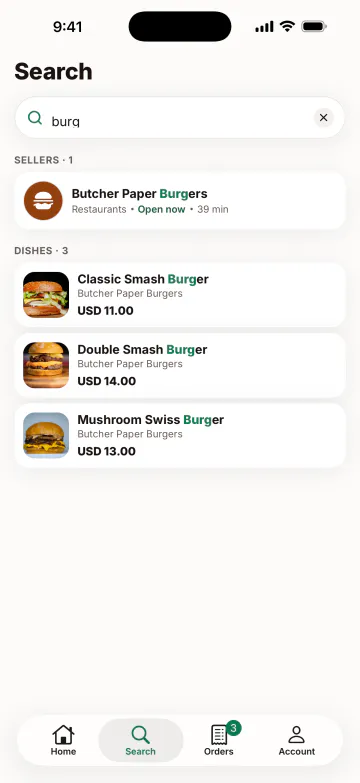
Categories, sellers that deliver to their address, and one search that finds both sellers and the things they sell.
-
Order in a few taps
Sizes, add-ons, a note for the seller, a promo code, delivery or pickup. Then one button.
-
Watch it arrive
The driver on a live map, an arrival time, a step-by-step timeline, and a four-digit code for the door.
-
A reason to come back
Invite a friend: they get a discount on their first order, you get credit to spend at any seller.
The real app. Your colors on it.
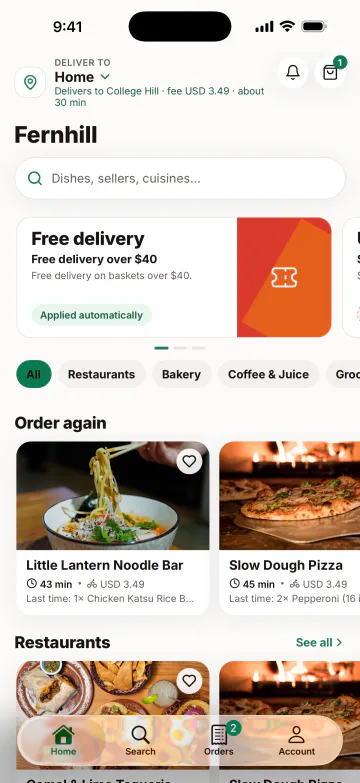
Five screens your shoppers will know by heart, shown here on our demo marketplace, Fernhill.
-
Home
Their address, your offers, the sellers near them.
-
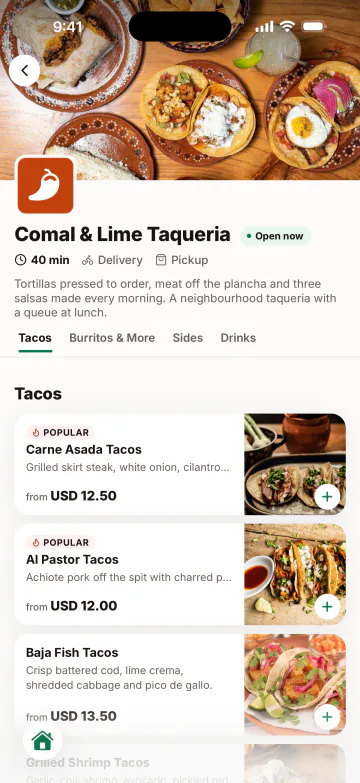
A seller
Hours, delivery or pickup, the full menu.
-
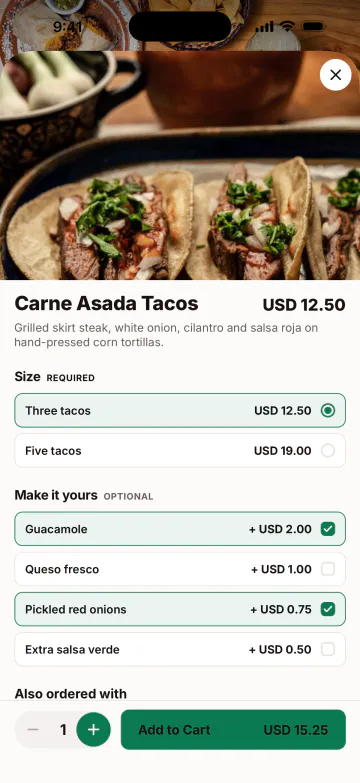
An item
Options and add-ons, priced as they tap.
-
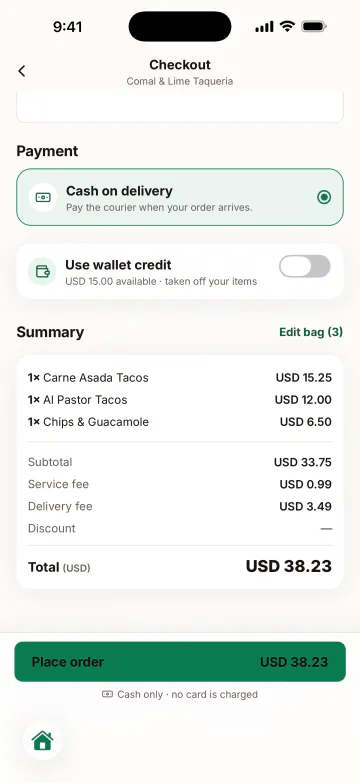
Checkout
Every fee shown before they place the order.
-
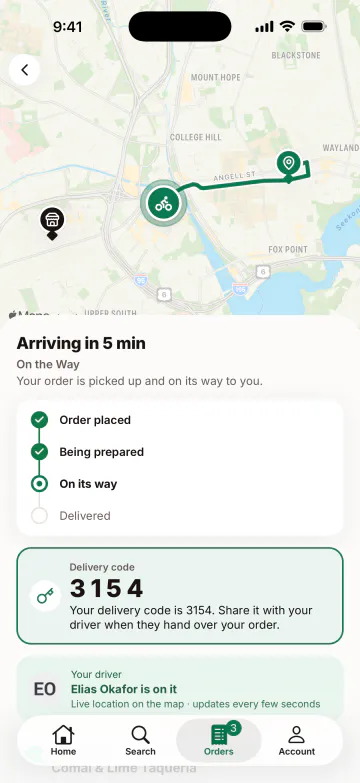
Tracking
Store, driver and door on one map.
They find it fast.
A shopper drops a pin on the map and the app answers with their zone, the delivery fee and the delivery time, before they have picked a thing.
- Sellers that deliver to their addressOr browse by area, or see everyone.
- One search for sellers and itemsNames and descriptions, in English and Arabic.
- Open now or closed, on every sellerA closed seller can still be browsed, with the time it opens.
- Your offers on the home screen
Exactly how they want it.
Pick a size, tick the extras, leave a note for the seller. The button shows the running price the whole way.
- Sizes and options, each with its own price
- Paid add-ons, in groups the seller names
- Special instructions on any itemThe seller and the driver both see the note on the order.
- A cart per sellerShoppers keep carts open at several sellers and check each one out when ready.
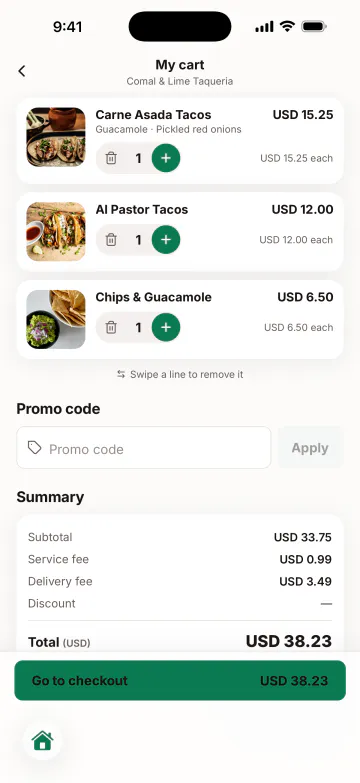
No surprises at the total.
Subtotal, delivery fee, service fee, tax, discount and total are all on screen before the order is placed. Then it is one button.
- Delivery or pickupWherever the seller offers both.
- A promo code, or a discount that applies itself
- Wallet credit, with one switchCredit earned from referrals pays for the items first.
- No account neededA guest orders with a name and a phone number, then tracks and cancels like anyone else.
- Pay in cashTo the driver when it arrives, or at the counter on pickup.
The driver, on the map, coming up the street.
The tracking screen moves by itself. The seller accepts, the order is ready, the driver picks up: each step shows on the shopper’s tracking screen the moment it happens.
- Store, driver and door on one mapThe driver’s position updates every few seconds once they set off.
- “Arriving in 12 min”A live arrival time and the road route, recalculated as the driver moves.
- Their driver’s name and photo
- A four-digit delivery codeSwitch it on and the driver cannot finish without it.
- A timeline of every stepPlaced, being prepared, on its way, delivered.
- Cancel until the seller accepts
Good to knowThe road route and the minute countdown run on Google road routing, which our team switches on. Without it the app shows the arrival time estimated when the driver accepted.
On the lock screen. In the Dynamic Island.
An order in progress sits on the iPhone lock screen with its status, a countdown to arrival and a progress bar, next to your seller’s name, the order number and the driver’s name. No need to open the app to know where dinner is.
- It speaks up when the status changesPreparing, ready, on the way, delivered. The arrival time updates quietly in between.
- In English or Arabic, like the app
What it needs
- An iPhone on iOS 16.2 or laterThe Dynamic Island needs an iPhone 14 Pro or newer.
- The order opened once in your app on that phone
- Live Activities left on for your app
- Your app’s current native buildUpdates with the app closed arrive through Apple’s push service, which our team sets up when it publishes your app.
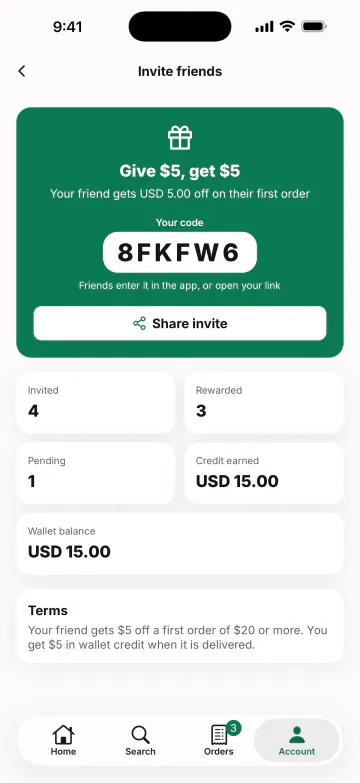
Your customers bring your next customers.
Every shopper has an invite code and a share button. You decide what the friend gets and what the inviter gets, once, in the admin portal.
- The friend gets a discount on their first order
- The inviter gets wallet creditWhen that first order is accepted or completed: your choice. It spends at any seller on your marketplace.
- Promo codes and automatic discounts work alongsideOne discount per order: the shopper always gets the bigger one.
Theirs to come back to.
An account keeps a shopper's addresses, their orders and their invite code. It is one account for every seller on your marketplace.
- Sign in with email and passwordPhone code, Google and Apple sign-in are available where our team has set them up for your marketplace.
- Saved addresses, each with a map pin
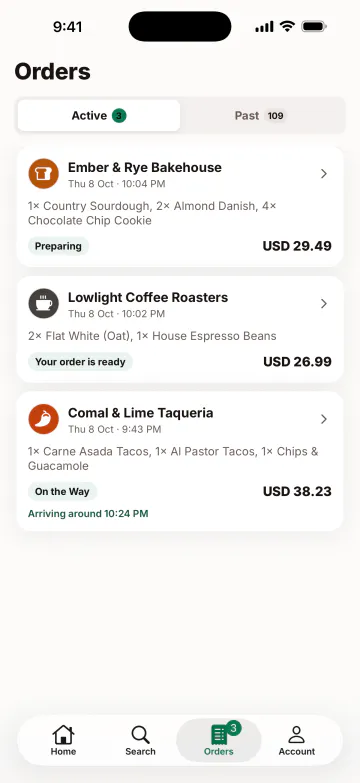
- Active and past orders in one tabAn active order opens its live tracking, a past one its receipt.
- Lock the app with Face ID or Touch ID
- Delete the account from inside the app
Add-on Early access
Your shoppers order out loud.
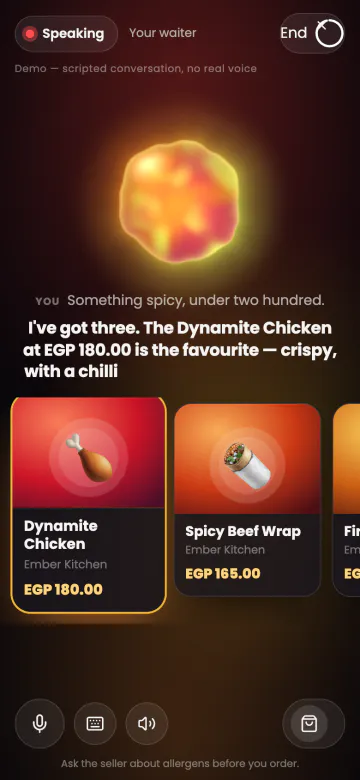
AI Waiter: a shopper says what they feel like, in English or Arabic. It suggests from your sellers’ menus, sorts out the options and builds the cart. They check out themselves. It is not in the customer app yet: it runs on the storefront website first, and the app comes next.
$500/mo add-on, on any plan. Not launched yet: it is a working prototype, and we are taking early-access requests.
How it runs today.
-
Cash today
Shoppers pay in cash, on delivery or at pickup. There is no card checkout in the app yet.
-
One push, then live screens
A signed-in shopper gets a push when the order is placed. After that the tracking screen and the Live Activity carry the status.
-
Built by our team
Your app is built with your name, icon and colors, and sent to the app stores by us. It comes with the Growth plan and up.
-
On the web too
Shoppers who will not install an app order on your storefront website. Live map tracking is in the app.
Go deeper.
- Referral ProgramWho gets what, and when.
- Wallet CreditEarned from referrals, spent at any seller.
- Accounts & Sign-inOne account, every seller. Or no account at all.
- Delivery Fees & ZonesThe fee a shopper sees for their address.
- Products & VariantsSizes, options and add-ons.
- Opening HoursOpen now, closed, paused.
The other screens of your marketplace: vendor app, driver app, admin portal, storefront website.
Your name on the icon. Your shoppers inside.
Tell us what you'd build. We'll help you launch it: your storefront, your sellers, your brand, live in under a week.
Rather talk first? Book a demo.