UMP · Unified Management Portal
The vendor management software behind your marketplace.
UMP is the admin portal behind every Upzaar marketplace. It’s where you add sellers, set your commission and your fees, draw where you deliver, and see exactly what every order earned.
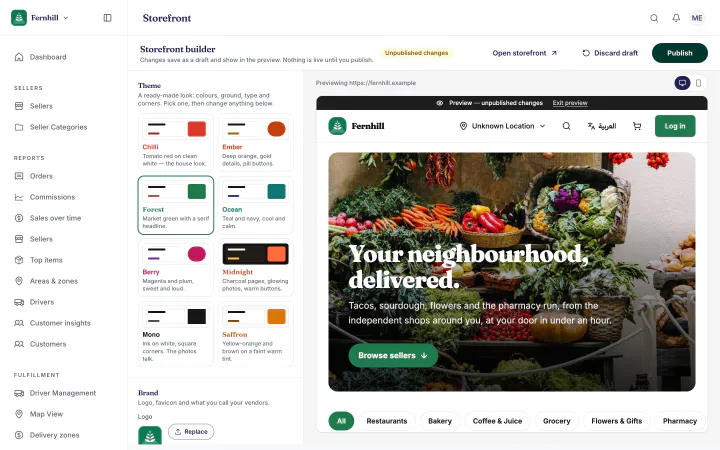
Your storefront website. Styled by you, in the portal.
Every marketplace gets a website where shoppers browse sellers and order. You pick one of nine presets, then change the colors, fonts, corners, home layout, hero and logo until it is yours.
- Edit a draft, preview it, then publishThe preview is the real storefront with your unpublished changes. Shoppers see nothing until you publish.
- Publishing carries your brand everywhereYour color, logo, favicon and your own word for sellers update with it, and the customer app reads them.
- A promo strip on the home page, when you want oneSwitch it on and your advertised offers show as cards shoppers can copy a code from.
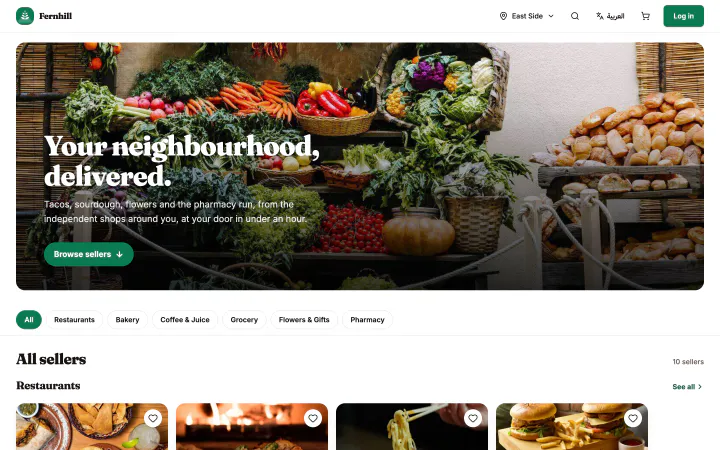
English and Arabic. Your currency.
The storefront, all three apps and the sign-in pages run in English and Arabic, with a true right-to-left layout. Your marketplace runs in one currency, and it can be any currency.
Good to knowThe portal itself is in English. A marketplace has one currency; there is no switching or converting between several inside it.
- Right-to-left, not just translatedLayouts mirror, and status lines, fee labels and push notifications follow each person's language.
- Names in both languagesEnter item, category and seller names in English and Arabic. A missing translation falls back to the other language.
- One currency per marketplace, any currencyEvery price, fee, limit, balance and report is in it. Nothing is converted.
- Your word for sellersRestaurants, shops, makers: the storefront and the portal use the word you choose.
Bring every seller on board, fast.
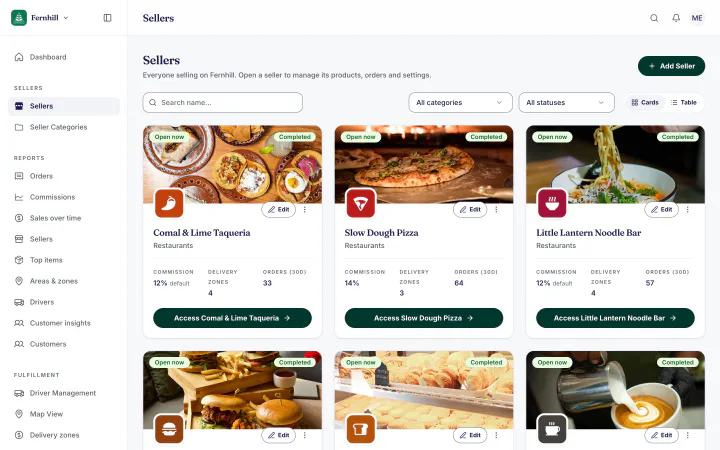
One form adds a seller: name, logo and cover, category, address, opening hours, delivery or pickup, and a commission rate if theirs differs. From then on they run their own menu and you never edit a listing for them.
- Every seller gets a web panel and the vendor appMenu, hours, discounts and orders, on a laptop or a phone.
- Menus with real depthCategories, items, photos, variants priced separately, add-ons, each in English and Arabic.
- Delivery, pickup, or both, per seller
You decide
Set your own commission. Not ours.
One rate for the whole marketplace. A different rate for any seller who has earned one. And, where sellers deliver their own orders, your choice of what the rate applies to: the items only, or the items plus their delivery fee. When your drivers deliver, the fee is yours and is never commissioned.
- A marketplace rate, with a per-seller override
- Fixed on each order when it is placedChange a rate tomorrow and last month’s report does not move.
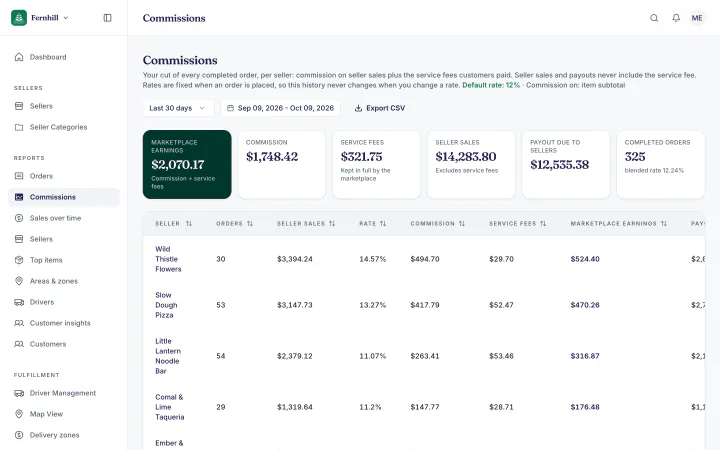
- A commissions report per sellerCompleted orders, seller sales, commission, service fees, your earnings and the payout due. Exports to CSV.
A second way to earn. And tax done properly.
Add a flat service fee to every order and keep all of it: it never counts toward seller sales, commission or payouts, and discounts cannot touch it. Set one sales tax and the totals add up at checkout.
- A flat service fee per order, kept whole by youExempt pickup orders if you like, and give any delivery zone its own fee, or none.
- One tax rate, with your name for itVAT, GST, sales tax. Added at checkout or already included in prices.
- You choose what the tax applies toItems, the delivery fee, the service fee. Your registration number is saved on every order.
Example · a pickup order#1042
- Items
- $40.00
- Service fee
- $1.00
- Customer pays, in cash
- $41.00
- Your commission · 12%
- $4.80
- Your service fee
- $1.00
- You earn
- $5.80
Seller’s payout due: $35.20
Draw where you deliver. Price each zone.
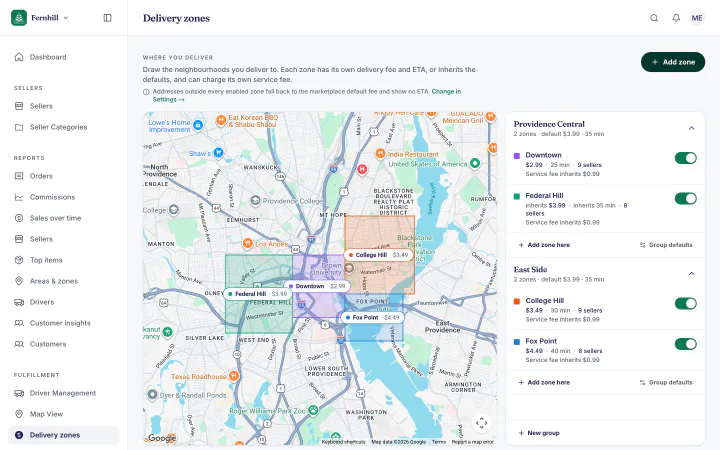
Draw your delivery zones on the map. Each one gets its own fee and delivery time, or inherits its group's, and the shopper sees both for their address before they order.
- A fee, a delivery time and a service fee per zoneLeave any of them empty and the zone uses the default.
- Switch a zone off without deleting it
- You decide what happens outside your zonesTake the order at a flat fallback fee, or refuse the address before checkout. Pickup still works.
- Choose which sellers the app lists in each zone
Good to knowZones are rectangles you drag on the map. The fallback fee outside your zones is a flat 3.00 in your currency.
Your own drivers. Every delivery on the map.
Invite drivers by email and choose the areas each one works. A new delivery is offered to every active driver in its area, and the first to accept takes it.
- Invite, assign areas, switch a driver on or off
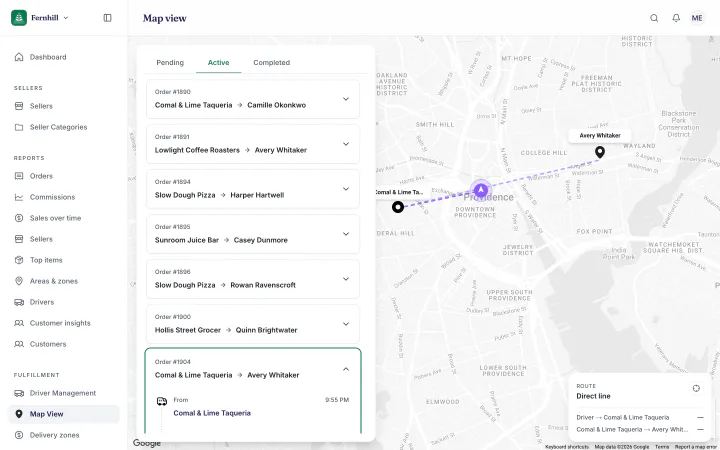
- Follow a delivery livePickup, drop-off and the driver's position, updated as they move.
- A four-digit delivery code at the door, if you want oneFive wrong codes lock the delivery until your staff unlock it.
- Require a fresh location before drivers go online
Good to knowDeliveries are offered, not assigned: there is no manual dispatch. The map follows one delivery at a time.
Cash on delivery
- 1The customer pays the driver in cashOr pays the seller at the counter on a pickup order.
- 2The ledger logs it on the driverThe delivery fee they earned and the cash they are carrying.
- 3The driver hands the cash in. You record the deposit.
- 4You pay sellers and drivers. You record the payout.The commissions report says what each seller is due.
Every dollar of cash, on a ledger.
Your customers pay in cash, so the question is always who is holding it. UMP keeps a ledger per driver: fees earned, cash collected, deposits and payouts, with a reason on every void.
- Cash held and owed to driver, always current
- A cash limit for everyone, or per driverAt the limit a driver stops being offered cash orders until they deposit.
- Payout due per seller, in the commissions report
Good to knowUpzaar does not move money. There is no card checkout and no automatic payout: deposits and payouts are records you enter after the cash or the transfer has changed hands.
Give shoppers a reason. Twice.
Build a discount in one form, and let your customers bring the next ones: every shopper has an invite code, and you decide what each side gets.
- Percent off, an amount off, or free deliveryFor a first order or an order total you set. With a code or applied automatically, a validity window and a usage limit.
- Sellers can run discounts for their own store
- You choose who pays for each discountThe marketplace, the seller, or a split. A marketplace-wide discount starts on you: sellers are paid as if there were no discount.
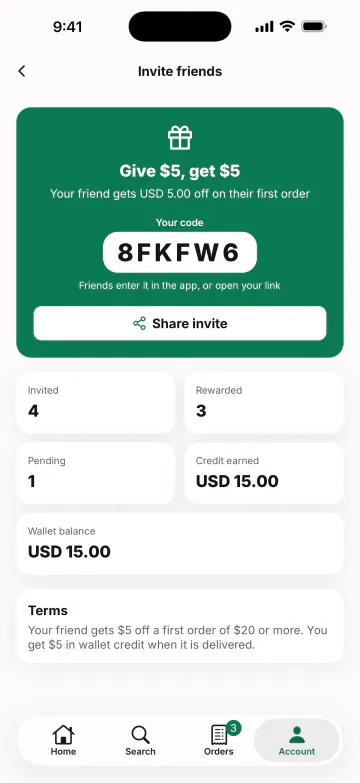
- One referral program for the marketplaceThe friend gets a first-order discount. The inviter gets wallet credit once that order is accepted or completed, with caps and expiry you set.
- Wallet credit spends at any seller
Good to knowOne discount per order: a promo code and a referral discount never stack, the shopper gets the bigger one. Wallet credit comes from referral rewards only; shoppers cannot top it up.
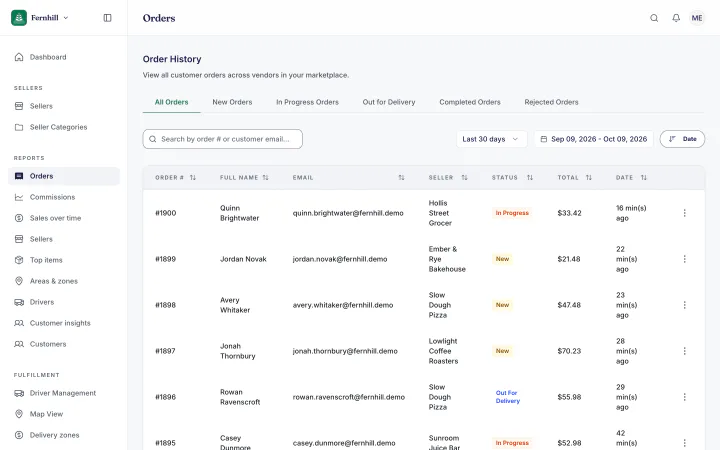
Every order in the marketplace, in one list.
Search by order number or customer email, filter by status and date, and open any order to see what was bought, what was charged and who delivered it.
- Short order numbers, yours aloneThey start at 1001, and the customer, the seller and the driver all see the same one.
- Cancel an order that has not finishedThe discount use and any wallet credit go back to the customer.
- Step in for a sellerAccept, reject or complete an order from the portal when a store cannot.
- Guests can order without an account
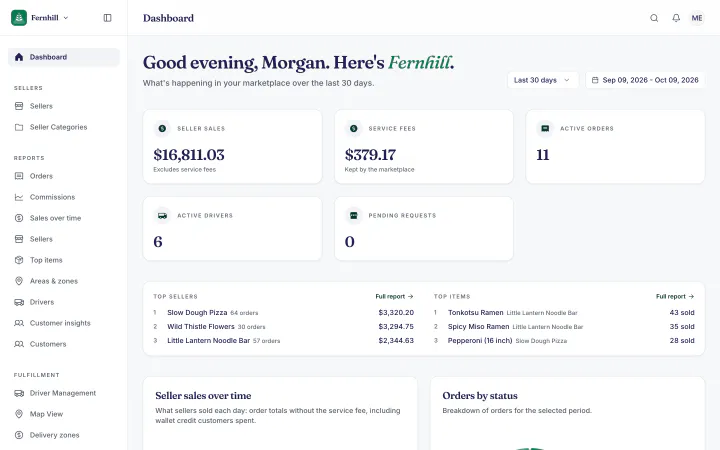
See exactly how your marketplace is doing.
A dashboard for the day and six reports for the long view, each report compared with the period before it.
- Sales over time, sellers, top itemsPlus a weekday-by-hour view of when your customers order.
- Areas and zones, drivers, customersWhere the orders go, who delivered them, who came back.
- Commission, service fees and tax, kept apartSeller sales never include your service fee or the tax added at checkout.
- A launch checklist on day oneAdd sellers, set delivery zones, invite drivers, share your storefront link.
Good to knowExport CSV saves the rows on screen, up to 500 items or 200 customers per report.
Hand out the keys. Keep the right ones.
Invite your team by email and give each person one role. They sign in with a link we email them: no password to forget.
- Owner and Brand Group AdminRun the whole marketplace.
- DispatcherDeliveries only: the delivery map and the zones.
- Brand AdminOne seller's menu and orders, nothing else.
- Restricted AccessThe starting role, with no elevated permissions.
How it runs today.
-
Cash today
Customers pay cash on delivery, or at pickup. Card payments are not in the product yet, so nothing is charged, held or refunded by the platform.
-
We build your apps
Your native apps are built, branded and sent to the app stores by our team. You do not publish or update them yourself.
-
Your address
Your storefront and portal live at your own upzaar.io address. You can create a marketplace yourself and be styling it the same day.
-
Plans, by people
There is no checkout for plans. Tell us which one fits and our team sets you up.
Your marketplace. Your terms.
Tell us what you'd build. We'll help you launch it: your storefront, your sellers, your brand, live in under a week.
Rather talk first? Book a demo.