Use cases Multi-brand operators
Eight outlets. Three brands. One app.
On the delivery apps each of your outlets is one tile among thousands. Upzaar gives the group its own storefront website and native apps, with every brand and outlet inside and your name on the icon.
200 orders a day × $28 an order × 30% commission
$50,400
a month to the delivery apps, on $168,000 of sales
Example numbers, not a promise. Move 15% of those orders to your own app and the estimate is $6,557 a month kept, after Upzaar and before your own delivery and marketing. Use your own ↓
Your brands are known. The orders go elsewhere.
A group with several brands and a dozen outlets is not a small restaurant with a commission problem. You have a head office, a brand people recognize, and customers who would walk past three competitors to get to you.
On a delivery app none of that counts for much. Each outlet is a tile in a list, next to the competitors, and the order is placed in the app’s name. The people who order from you every week do it in an app that is not yours.
A group is exactly who can change that, because you already have what an own channel needs: outlets across the city, and regulars who already know the name.
If your group also employs its own delivery drivers, read restaurant groups with their own drivers: the same setup, seen from the driver app, the live tracking and the cash.
30% is the published top-plan commission; ads and promotions are extra, lower plans exist, and a business your size may have agreed its own rate. Sources: Uber Eats merchant pricing, Restaurant Dive on DoorDash’s plans .
Your group, in Upzaar's words.
Upzaar is built as a marketplace: one operator, many sellers. Head office is the operator and your outlets are the sellers. The second row decides whether this fits you.
-
You haveThe group
In Upzaar it isThe marketplace
One name, one storefront website, one customer app, one admin portal.
-
You haveA brand with several outlets
In Upzaar it isOne seller per outlet
A seller has one address, one menu and one set of hours. A price change is made in each outlet's menu.
-
You haveHead office
In Upzaar it isOperators
See every outlet, every order and every report.
-
You haveAn outlet manager
In Upzaar it isSeller staff
Sees and runs only that outlet.
In Upzaar’s words, what you run is a marketplace, even when every seller in it is yours. See the admin portal →
One app. Every outlet inside.
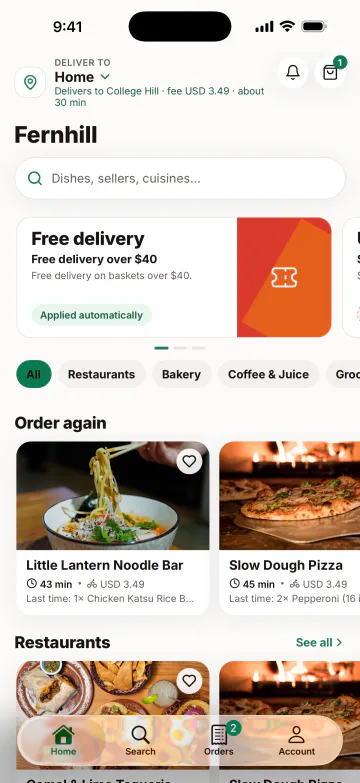
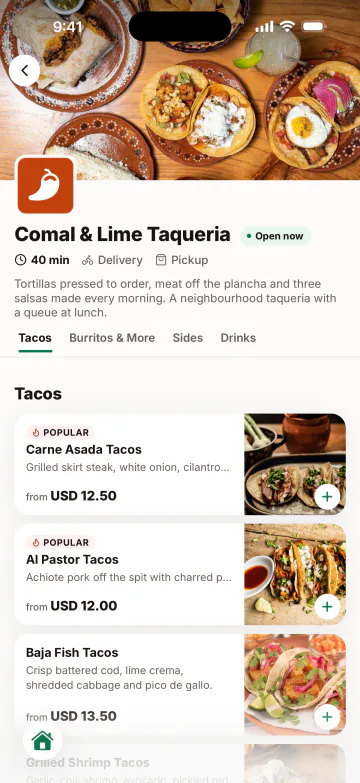
Your customers download one app, or open one website, with your group's name and colors. Inside it: every brand, every outlet, each with its own page and menu.
- Built and published by our teamNative iOS and Android apps under your name, with your own app store listings.
- The address comes firstA shopper drops a pin and sees who delivers there, the fee and the delivery time, before ordering.
- English and ArabicRight to left where it should be, with dish and outlet names in both languages.
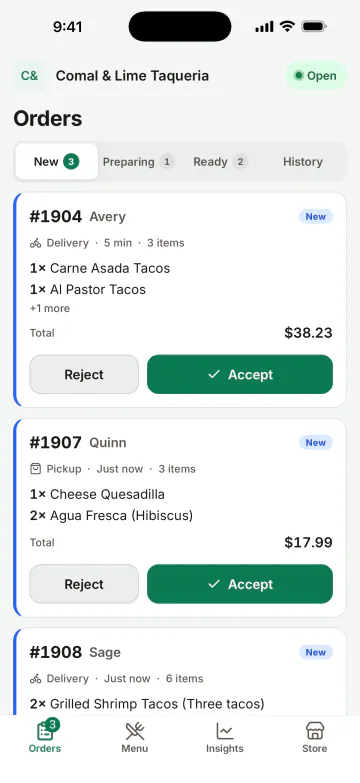
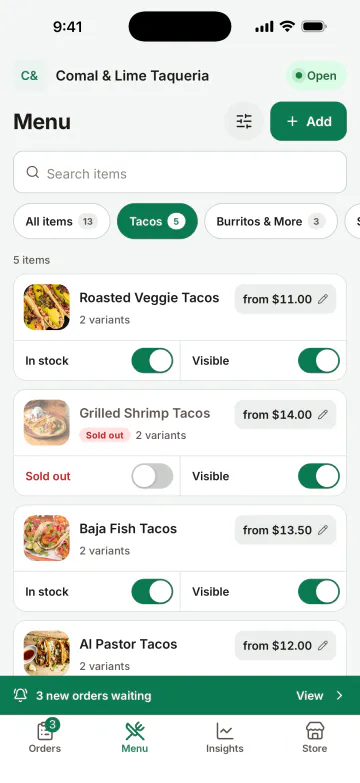
Each outlet runs its own shift.
Every outlet has the vendor app: a new order takes over the screen and rings, the manager accepts with a prep time, and marks it ready.
- Accept, prep time, readyOrders sit in New, Preparing, Ready and History, with a countdown on each one being prepared.
- Sold out at this outlet onlyOne switch per item. The other outlets keep selling it.
- Hours and pause per outletOne outlet can pause for 30 minutes on a bad night without closing the brand.
Every outlet on one page.
The admin portal is head office's side: all outlets, all orders, and reports that rank one outlet against another.
- Sales by outletEvery outlet ranked by sales, orders, average order and cancellation rate, against the period before. CSV export.
- Every order in the groupSearch by order number or customer email, filter by status and date, and cancel an order that has not finished.
- Roles for head office and outletsOwner, Brand Group Admin, Dispatcher, and Brand Admin for the staff of one outlet. Sign-in is an emailed link.
Good to knowThe group's order list cannot be filtered by outlet; each outlet's own panel has its order history.
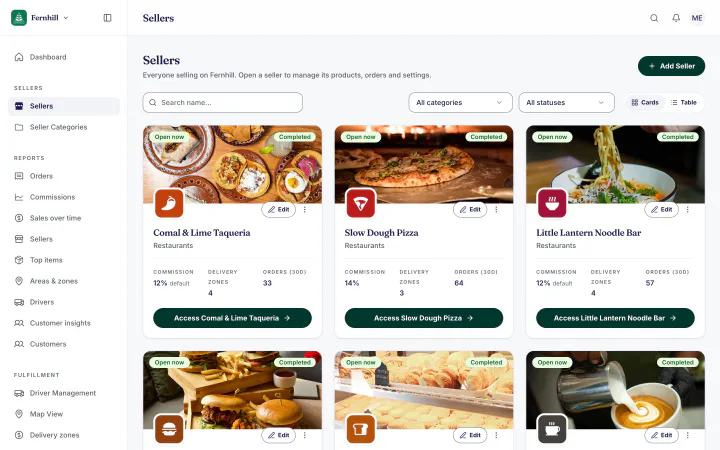
The screens above are real screens of the product on Fernhill, our demo marketplace of local food and shops. Yours carries your name, your colors and your sellers.
What do your regulars cost the group on the apps?
Four numbers head office already has. The answer is what the orders you move cost on the aggregator, and what the same orders cost in an app you own.
Estimate
The difference, a month
An estimate, not a promise$6,557
900 of your 6,000 orders, placed on your own channel instead: $7,560 in aggregator commission against $1,003 to Upzaar.
At these numbers your own channel costs more than it saves. It needs more orders moved, or a smaller plan.
Not in this number, because we cannot know it: Your own delivery: a top aggregator plan usually includes their drivers, and in your own app the drivers are yours, or it is pickup. What it costs to move customers into your app: table cards, bag flyers, a first-order discount. Keeping a menu per outlet up to date.
Your numbers
This is a worked example with the numbers below. With JavaScript on, you can change every one of them.
The orders you move, a month
- Orders moved (15% of 6,000)
- 900
- Their order volume, at $28.00 an order
- $25,200
- On the aggregator, at 30%
- $7,560
- Upzaar Growth plan
- −$499
- Upzaar platform fee, 2% of that volume
- −$504
- The difference
- $6,557
The whole month
Where it starts to pay: the Growth plan is covered at 64 orders a month on your own channel (1.1% of your orders). Each one is worth $7.84 to you before the plan’s price. the Growth plan would need 64 orders a month on your own channel, more than you have in total. Try a smaller plan. it does not, at this rate: an order on your own channel brings in no more than Upzaar’s platform fee takes.
How this is calculated, and how to read it
How this is calculated
Read it honestly
- The share is the guessIt starts at 15% on purpose. The aggregator still brings people who have never heard of you; your own channel is for the ones who have. Nobody can promise you a share.
- Upzaar’s cost is all of itThe plan ($79, $499, $1,499 a month) plus 2% of the order volume on your channel. Nothing else from us.
- No card fees to modelOrders on Upzaar are paid in cash, on delivery or at pickup. Card payments are not in the product today.
Want the split of a single order instead? Marketplace commission calculator →
What it does not do yet.
You run a real operation, so here is the list before you ask. None of these is in the product today. For each, what you would do instead.
- A seller with several branches and one shared menu
- Not built. Each outlet is its own seller with its own menu, hours and staff. A menu change is made outlet by outlet, in the admin portal or the vendor app.
- Sending the order to the nearest outlet
- The customer chooses the outlet. The customer app narrows the list to outlets that deliver to their address; the website lists every outlet, and checkout does not refuse an outlet that is outside its zone. Name outlets by area so the choice is obvious.
- One login for an area manager
- A team member has one role, and seller staff belong to one outlet. Someone who covers several outlets needs an operator role, which sees all of them.
- A link to your POS, ERP or accounting
- None, and there is no public API or webhook. Reports export to CSV from the screen you are on.
- One basket across outlets or brands
- A cart belongs to one seller, so one outlet. Two brands in one sitting is two orders.
- Card payments
- Customers pay in cash, on delivery or at pickup. There is no card or online payment in the product today, so there is no card fee and no automatic payout either.
The plan that fits
Growth
$499 /mo + 2% of orders
Or $399/mo billed annually. Up to 50 sellers.
Your own customer app and vendor app, built by our team under your group's name, with room for 50 sellers. Count every outlet of every brand as one.
- Scale, $1,499
- From 51 to 200 outlets, or when you run more than 5 drivers of your own: the driver cap comes off.
- Enterprise
- More than 200 outlets, or work that is not in the product. Custom pricing, scoped with our team: talk to us.
- Starter, $79
- The storefront website and the admin portal for up to 10 sellers. No native apps, so outlets get no ringing alert.
Start with the outlets that already deliver.
- 1Tell us how many brands and outlets you run, and who delivers today. We reply by email.
- 2Add each outlet as a seller, named by brand and area, with its address and menu.
- 3Draw a delivery zone per outlet, set its fee and time, and link the outlet to it. Or switch on pickup.
- 4Invite each outlet's staff to the vendor app, and head office to the admin portal.
- 5Announce it where your customers already are: the tables, the bags, the receipts, your social accounts.
Plans are set up by people: there is no checkout, our team sets you up and bills you directly. The seller and driver counts are the terms of each plan. Our team builds your native apps and sends them to the app stores, on iOS and Android.
Questions.
Is each outlet a seller, or a branch of one seller?
A seller. In Upzaar a seller has one address, one menu and one set of opening hours. A brand with five outlets is five sellers, each named so customers can tell them apart. Running one seller with several branches under a shared menu is not built.
Does the app send the customer to the nearest outlet?
No. The customer chooses. In the customer app, a shopper with a delivery address inside one of your zones is shown the outlets linked to that zone. On the storefront website every outlet is listed, and checkout does not stop an order to an outlet outside its zone.
Can head office manage one menu for all outlets?
No. Each outlet has its own menu. A new dish or a price change is entered in each outlet's menu, by head office in the admin portal or by the outlet in the vendor app.
Can I see sales by outlet?
Yes. The sellers report ranks every outlet by sales, orders, average order value and cancellation rate, compared with the previous period, and exports to CSV. The commissions report adds your commission and the payout due per outlet, which matters when some outlets are franchised.
Is there a loyalty program?
No. Points, tiers and loyalty cards are retired and not offered. There are promo codes, automatic discounts, free delivery, and a referral program that gives the friend a first-order discount and the inviter wallet credit.
How do customers pay?
In cash, on delivery or at pickup. There is no card or online payment in the product today. On the Enterprise plan a card payment integration can be scoped as custom work with our team; it is not something you can switch on.
Who builds the app, and under whose name?
Our team builds the customer and vendor apps with your group's name, icon and colors and sends them to the App Store and Google Play. You do not need a developer. The storefront website you can create and style yourself the same day.
Other businesses that already take orders.
-
You have the drivers
Restaurant groups with their own drivers
You already pay the drivers. Get the ordering app and the driver app that go with them, with every location inside.- Each location is a seller, with its own menu and hours.
- Driver app, live tracking, cash ledger, cash limits.
- Jobs are offered, not assigned. No POS link.
-
One kitchen, many brands
Ghost kitchens
Every virtual brand you cook, on one storefront and one app with your name on it.- A virtual brand is a seller. One form adds one.
- Your commission on your own brands: 0%.
- One cart per brand. No aggregator or POS link.
-
You have the fleet
Delivery companies
You deliver the order today. Take the order too, and earn the commission as well as the fee.- A merchant you deliver for is a seller.
- Driver app, cash ledger, cash limits, delivery code.
- Jobs are offered, not assigned. No batching, no outside jobs.
Starting from zero, with no orders yet? That is a different page: the marketplace ideas directory →
Your customers know the name. Put it on the app.
Tell us what you run today: how many brands and outlets, roughly how many orders, who delivers. We reply by email with what fits, what does not, and a plan.
Opens our contact form with a first line filled in. Rather talk first? Book a demo.