Marketplace ideas Grocery · Delivery
QuickCart
Corner shops deliver your neighborhood's groceries and essentials.
They stock the shelves. You bring the orders, charge a small commission and a flat fee per order, and the money stays on the block.
- An idea. Not a company. Yet.
Fix one thing Our verdict on Pitch Night. Why ↓
- Orders a day
- 80
- Average order
- $18
- You earn, a month
- $6,720
An estimate from illustrative numbers (the “growing” stage), not a promise. Change every one of them ↓
The shop on your corner has everything. Except an app.
There are about 152,000 convenience stores in the US, and most of them are not chains: 63% belong to an owner with ten stores or fewer. They are open late, they are close, and they stock what people run out of.
The big delivery apps were built around restaurants and supermarkets. A corner shop that wants to be on them hands over a restaurant-sized commission on a low-margin basket, and gets a listing buried under national brands. So most stay offline and take the odd order by phone.
That is your opening. You do not need a warehouse or your own stock. The shelves are already full, one street from the customer. You bring the orders.
- 152,000 convenience stores in the US Source: NACS industry store count, 2026
- 63% of them belong to owners with ten stores or fewer Source: NACS industry store count, 2026
Fix one thing
The Pitch Night verdict
Make small orders pay their way. On the show: set a minimum order.
- Demand
- Supply
- Margin
The hard question: Who pays to deliver one soda?
Who sells. Who buys.
Your sellers
Independent corner shops, mini-markets and bodegas. The owner is usually behind the counter, already knows the neighborhood, and already has the stock. What they do not have is a way to take an order from someone two streets away.
Where to find the first ten
- 1Walk one neighborhood, not the city. Ten shops inside a fifteen-minute delivery radius beat thirty spread across town.
- 2Start with the shops that already take phone or WhatsApp orders. They have proved the demand and hate the admin.
- 3Ask each owner for their fifty best sellers and list only those. Nobody needs the whole shelf on day one.
- 4Pitch the owner at a quiet hour, with the app open on your phone and their shop already in it.
- 5Ask every shop you sign which shop nearby you should sign next.
Your buyers
People within a short ride of the shop: families who ran out of something, students, anyone who does not want to go back out. They are not planning a weekly shop. They want milk, bread, snacks or nappies tonight.
How often they come back
Often, in small baskets. That is the whole problem and the whole opportunity: the habit is weekly or better, but one order is worth little.
How you get paid.
-
Commission
Grocery margins are thin, so keep the rate low. A shop that makes a slim margin on a carton of milk cannot give you a restaurant-sized cut.
On Upzaar: one rate for the marketplace, with an override per seller. Not per category.
-
Service fee
This is your answer to the hard question. A flat fee on every order means a one-soda order still pays you something, and it nudges people to add a few more things.
On Upzaar: one flat fee per order, paid by the customer. The marketplace keeps it.
-
Delivery
Short trips inside one neighborhood. Charge the customer a clear fee per zone and keep the zones small.
On Upzaar: you set a delivery fee per zone you draw. Today the driver’s earning for a job is that fee, so the calculator starts your delivery margin at zero.
Know this before you start: orders are paid in cash today.
The customer pays the driver at the door. Card payments are not live yet. The driver app tracks the cash each driver holds, you record their deposits, and the commissions report shows what each seller sold, your cut and the payout due. Plan a weekly settlement with sellers and drivers.
What could QuickCart earn you?
Prefilled with our starting assumptions for this idea. Every number is yours to change, and the formula is at the bottom.
Estimate
You earn, per month
An estimate, not a promise$6,720
Before your costs. 15.6% of the order volume.
- Commission
- $4,320
- Service fees
- $2,400
- Delivery margin
- $0
Change the numbers
- Orders per day
- 80
- Average order value
- $18.00
- Your commission
- 10%
- Your service fee per order
- $1.00
- Delivery fee the customer pays
- $3.00
- What you pay the driver
- $3.00
- Days open per month
- 30
This is a worked example. With JavaScript on, you can change every number.
The month
- Orders
- 2,400
- Order volume (GMV)
- $43,200
- Your sellers keep
- $38,880
- Your drivers are paid
- $7,200
One order
- The customer pays
- $22.00
- The seller keeps
- $16.20
- You earn
- $2.80
What your sellers pay in commission, per month
$8,640 a month stays with your sellers. 30% is the published top-plan commission; ads, promos and refunds are extra. Sources: Uber Eats merchant pricing, Restaurant Dive on DoorDash’s plans .
Same numbers, three stages
Only the orders per day change. Pick one to load it.
How this is calculated
- Commission is taken on the order value only, not on delivery or service fees.
- The currency menu swaps the symbol. There is no exchange rate anywhere.
- Not subtracted: your Upzaar plan and its platform fee on order volume (see pricing), payment processing if you add a card gateway, marketing, and your own time. The break-even calculator takes those off.
- Promotions, refunds and canceled orders are not modeled. Real months are lumpier than this.
Where the prefilled numbers come from
- Orders per day (illustrative): Illustrative. 80 orders a day is 8 orders per shop across 10 shops in one neighborhood. Starting out is 2 a shop; established is 25 shops at 10 each.
- Average order value (illustrative): Illustrative. A top-up basket of a few essentials, not a weekly shop.
- Commission (illustrative): Illustrative. Low on purpose: Pitch Night scored this idea's margin 2 out of 5.
- Service fee (illustrative): Illustrative. The flat fee that stands in for a minimum order.
- Delivery (illustrative): Illustrative. The fee and the rider's pay start equal: on Upzaar today the driver's earning for a job is the delivery fee the customer paid.
- Days open (illustrative): Corner shops open every day.
Illustrative means we picked a plausible starting point and told you why. It is not data about a real marketplace. Replace it with what you learn from your own sellers.
What QuickCart looks like on Upzaar.
Real screens from Fernhill, our demo marketplace of local food and shops. Yours carries your name, your colors and your sellers.
-
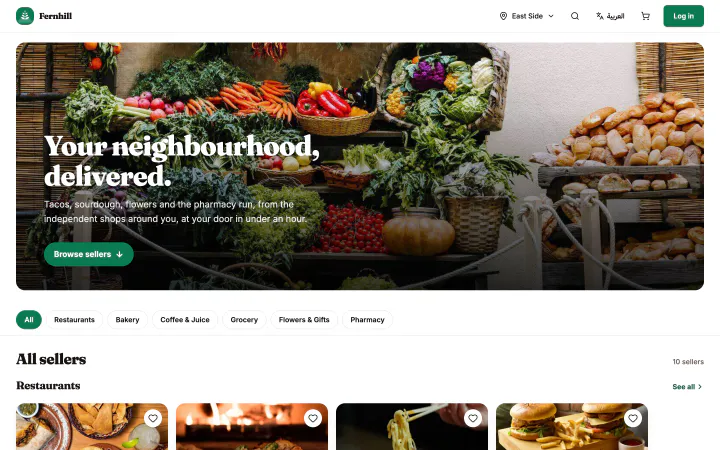
Storefront websiteYour storefront website: every shop in the neighborhood on one page, in your colors.
-
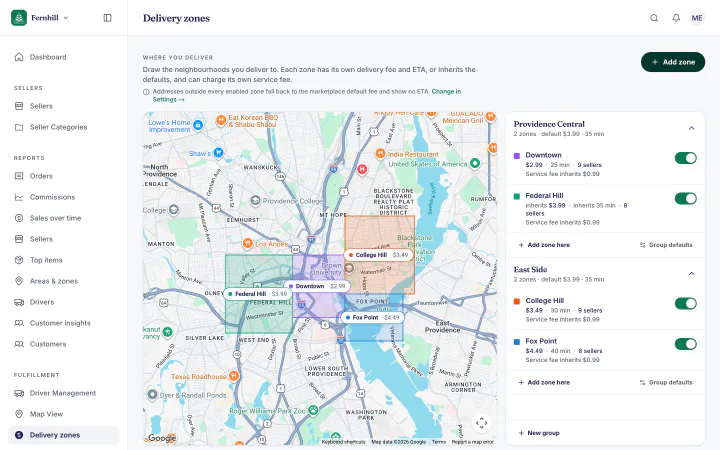
Admin portalYou draw the delivery zones yourself. Keep them tight and give each its own fee.
-
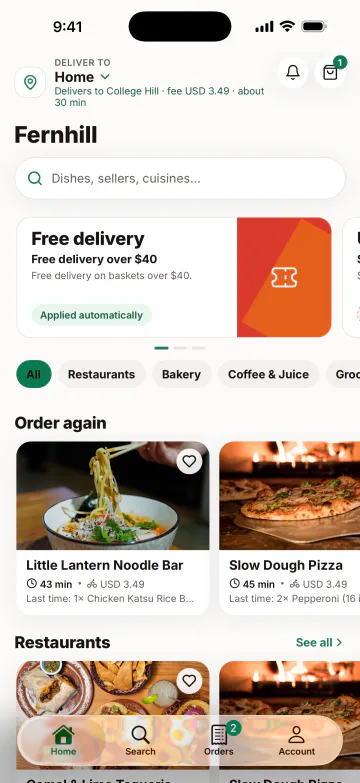
Customer appYour customers open your app, not a giant's, and see the shops that deliver to their address.
-
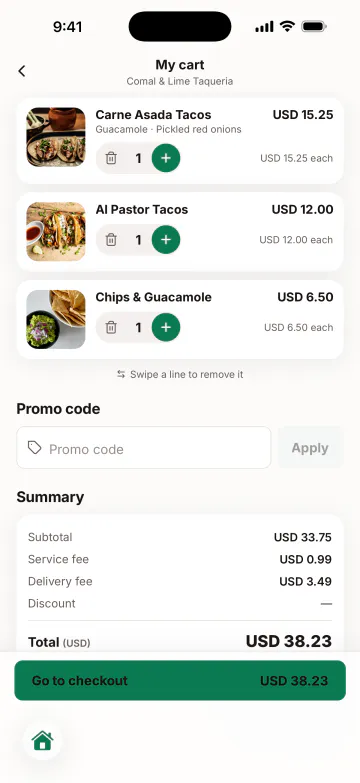
Customer appThe cart shows your service fee and the delivery fee before they order. No surprises.
-
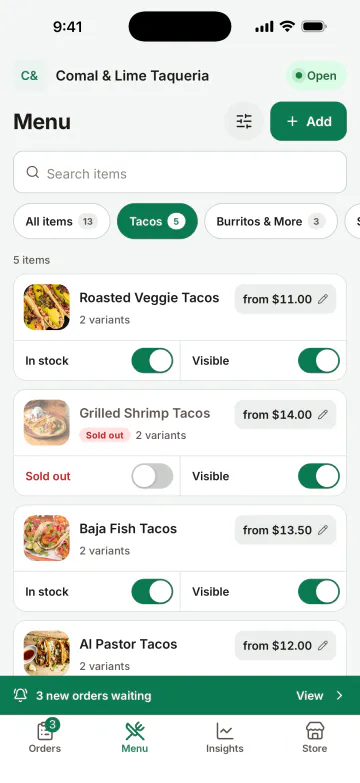
Seller appA shopkeeper marks a product out of stock from their phone, the moment the shelf is empty.
-
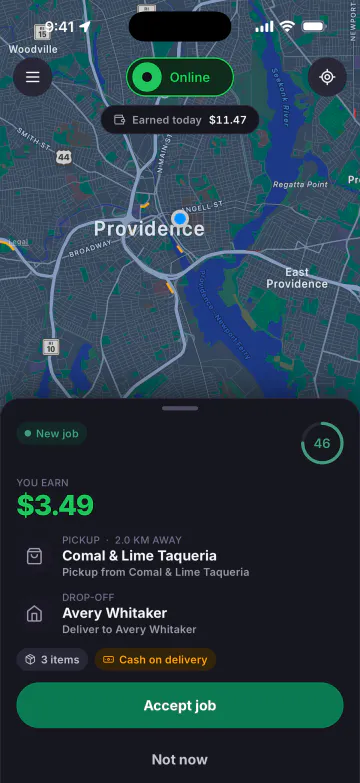
Driver appA rider nearby gets the job with what it pays and where it goes. Cash on delivery.
-
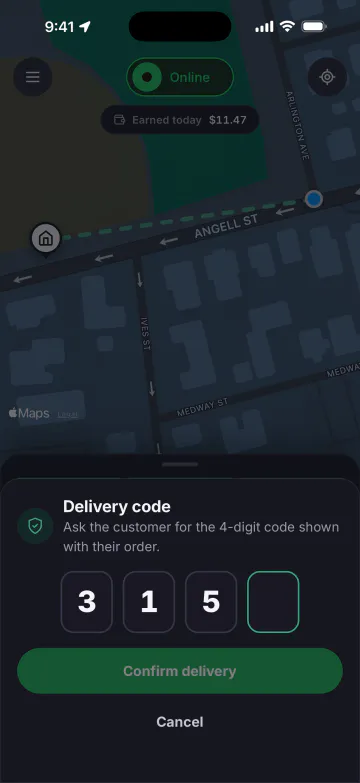
Driver appThe hand-over code proves the bag reached the right door.
Not built yet, and what version one does instead
- A minimum order
- There is no minimum-order setting. Version one uses the flat service fee and the delivery fee to make small baskets pay their way, and a promo code that rewards a bigger one.
- A 15-minute promise
- Upzaar does not guarantee delivery times. Shops accept each order with their own prep time and the customer tracks the rider live. Small zones are what make it fast.
- Card payments
- Orders are paid in cash today. See “How you get paid” above for how the money moves.
What you would run it on
- The storefront website and the admin portal are in every plan. Enough to prove QuickCart with your first sellers.
- Your own customer and seller apps in the app stores come with the next plan up, along with the driver app for your first five drivers.
- Unlimited drivers come with the plan above that. On the first plan, start with pickup or let sellers hand orders over themselves.
The QuickCart launch checklist.
-
Week 1
Pick the block
- Choose one neighborhood you can cross in fifteen minutes.
- Visit every corner shop in it and note who already takes phone orders.
- Tell us what you are building; we set up your storefront.
-
Week 2
Sign ten shops
- Agree one commission rate and put it in writing.
- List each shop's fifty best sellers with photos and prices.
- Show each owner how to accept an order and mark an item out of stock.
-
Week 3
Line up riders
- Draw two or three small zones and set a fee for each.
- Recruit two or three riders who live in the neighborhood.
- Run ten test orders end to end, cash and hand-over code included.
-
Week 4
Open the doors
- Put a QR code on every shop's counter and door.
- Give first customers a first-order promo code.
- Settle with shops and riders at the end of the week, and fix what was slow.
Read before you start, from Marketplace University
-
Cold Outreach
Where to Find Your First Vendors (Before You Have Any Customers)
You don't need a big audience to land your first vendors — you need the right handful of places to look.
-
Customer Experience
The Psychology of Free Delivery
45% of shoppers abandon carts over shipping costs — why 'free delivery' moves purchase decisions more than the price tag itself.
-
Getting Started
Your First 30 Days: A Launch Checklist for a New Marketplace
From describing your idea to going live under your own brand — a practical week-by-week checklist for launching a hyper-local marketplace.
Ideas next door.
-
Grocery
Pickup
FreshTable
Your farmers' market, open the other six days. Local growers and food makers sell one day a week. You take their orders online all week, for pickup first, and earn a commission on each one. You could earn, at 40 orders a day $4,888 / month -
Food
Delivery
CityEats
Your city's own delivery app: every local restaurant, one app, your commission. They cook. You run the app, charge half or less of what the giants charge, and the difference stays in your city. You could earn, at 120 orders a day $20,880 / month -
Retail
Delivery
PetalBlock
Your city's real florists, on one storefront. They arrange it. You send the orders, straight to a real local shop, and keep a commission the shop agreed to. You could earn, at 20 orders a day $7,050 / month
Nobody owns QuickCart in your city. Yet.
Tell us where you would start. Our team sets up your storefront with you: your name, your sellers, your commission, live in under a week.
Opens our contact form with this idea filled in. Rather talk first? Book a demo.