What customers pay: fees, tax and the total
Each line a customer sees in the price summary, where it comes from, and how the app and the website show tax differently.
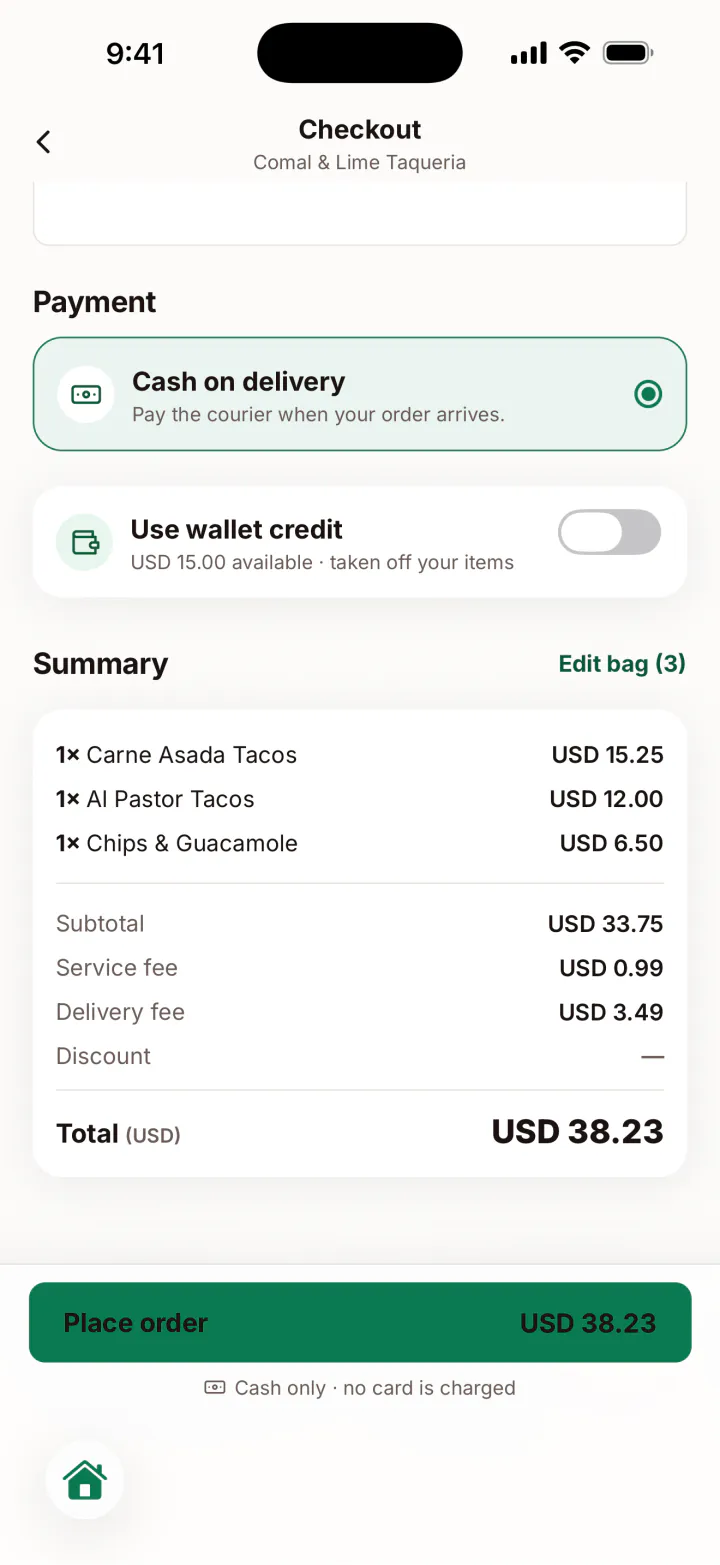
The price summary lists what the customer is charged, line by line, and ends with the total they pay in cash. The same lines appear in the cart, at checkout and on the order.
How it works
| Line | What it is | Shown when |
|---|---|---|
| “Subtotal” | The items, with their chosen sizes and extras. | Always. |
| “Delivery fee” | The fee of the delivery zone the address is in. Outside your zones it is a fixed 3.00, if you accept those addresses. | Delivery orders, once an address is chosen. |
| “Service fee” | Your flat fee per order, or the zone’s own service fee when you set one. | When you charge one. |
| Tax row | Tax added on top, with your tax name. | Only when your tax is added at checkout. |
| “Discount” | A promo code or automatic discount, with its name. | When one applies. |
| “Referral discount” | The discount from a friend’s referral code. | When one applies. |
| “Wallet credit” | Credit the customer chose to use. | When switched on at checkout. |
| “Total” | What is left to pay in cash. | Always. |
The total is the amount the driver collects, or the amount paid at the seller for pickup.
Tax
- On the website, tax added at checkout shows as a row with its name and rate. Tax already included in prices shows as a quiet line under the total that starts with “Includes”. The order page also shows “Tax registration no.” when you entered one.
- In the app, tax added at checkout shows as a plain row with your tax name. When prices include tax, the app shows nothing about tax. It never shows the registration number.
Good to know
- Fees are per order, so per seller. Two sellers mean two delivery fees and two service fees.
- Discounts and wallet credit apply to the items. They never reduce the service fee or the tax. Wallet credit never pays the delivery fee.
- With a free-delivery discount, the discount cancels out the delivery fee.
- In the app’s cart the delivery fee reads “Set at checkout” until an address is chosen.
- On the website the cart shows no delivery fee until checkout, so the total rises once an address is chosen.
- No receipt is emailed. The order page or order screen is the customer’s record. The app’s checkout labels the optional email “For your receipt.”, but no email is sent.
- There is no tip line.
If something goes wrong
| The customer says | Cause | What to do |
|---|---|---|
| “The total changed at checkout” | The delivery fee and any zone service fee were added when the address was chosen. | Explain that both depend on the address. |
| “I was charged a service fee on pickup” | “Applies to pickup orders” is on. | This is your setting in Settings, General. |
| “Where is the tax on my receipt?” (app) | The app has no tax note for prices that include tax. | Send the customer to the order page on the website, or give the figure from the admin panel. |
| “My discount did not reduce the fee” | Discounts do not apply to the service fee or tax. | Explain the rule. |
Answer you can reuse
Your total is your items, plus the delivery fee for your address and a service fee, minus any discount. You pay that total in cash when your order arrives.