How customers pay: cash on delivery
Customers pay in cash to the driver or at the seller; card payment, tips and refunds do not exist yet.
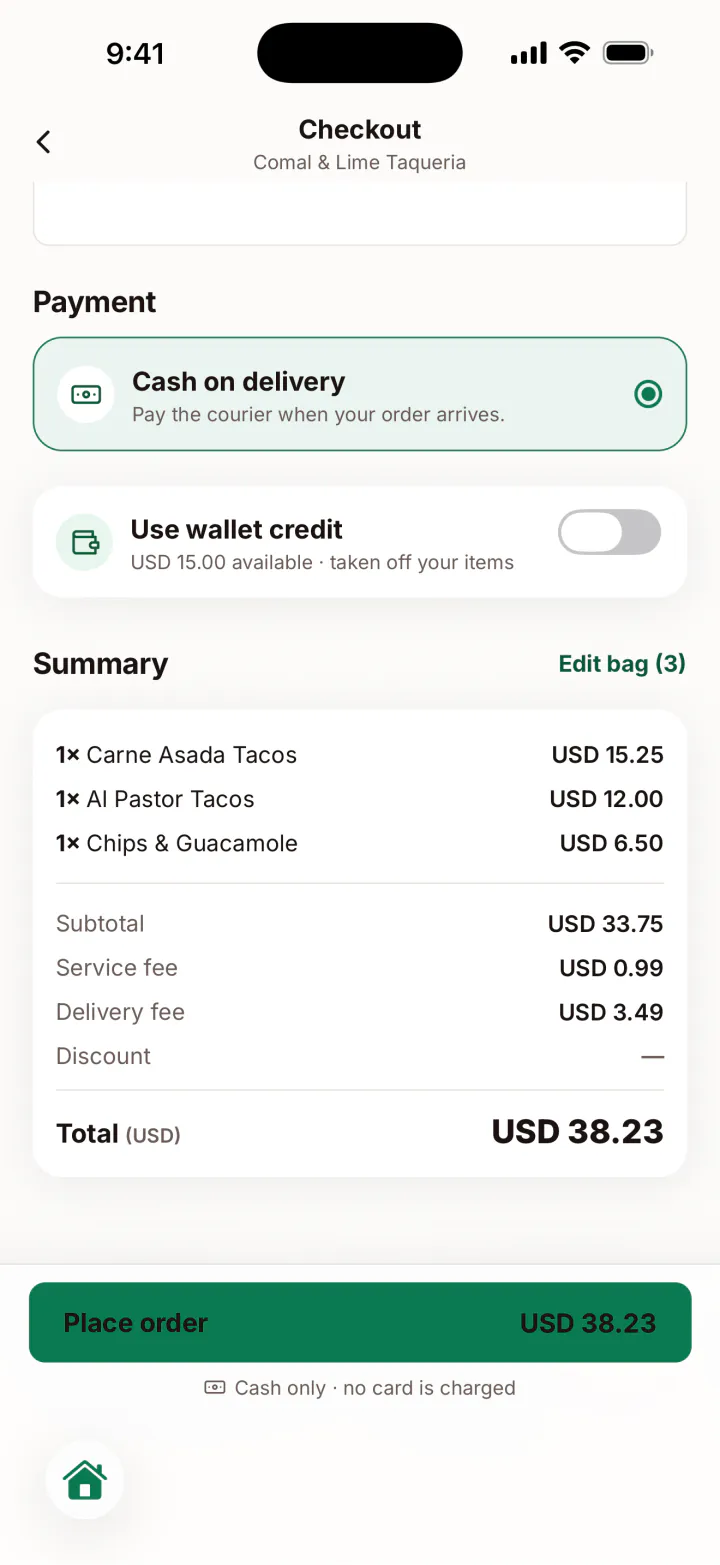
Every order is paid in cash: to the driver on delivery, or at the seller for pickup. No card is asked for, and no payment is taken through the app or the website.
How it works
- In the app the “Payment” section has one option, already selected. For delivery it reads “Cash on delivery” with “Pay the courier when your order arrives.” For pickup it reads “Pay at pickup” with “Pay when you collect your order.” Under the button the app says “Cash only · no card is charged”.
- On the website the payment card has one option, “Cash on delivery”. It reads the same for pickup.
The amount to hand over is the order’s “Total”. The driver sees the same amount to collect.
A signed-in customer with wallet credit can switch on “Use wallet credit” to lower the cash total. Credit pays for items only, so there can still be cash to pay for delivery and fees.
What others see
The driver app shows the cash to collect on the job. The seller sees “Cash” as the payment on the order.
Good to know
- Nothing is charged online, so there is nothing to refund. When an order is canceled or rejected, a promo code it used becomes usable again and any wallet credit is returned. No money moves.
- If a customer paid cash and there is a problem with the order, any money back is between you, the seller and the customer. The platform has no refund tool and keeps no record of one.
- There is no tip option.
- Customers cannot save a card or pay by card, wallet top-up or bank transfer.
- No receipt is emailed. The order page is the record of what was paid.
If something goes wrong
| The customer says | Cause | What to do |
|---|---|---|
| “I want to pay by card” | Card payment does not exist. | Explain that payment is in cash on delivery. |
| “The driver asked for a different amount” | The driver collects the order’s “Total”. An order cannot be edited after it is placed, so the total does not change. | Compare with the total on the order in the admin panel. |
| “I canceled. When do I get my money back?” | Nothing was charged. | Confirm that no payment was taken. |
| “I paid cash and the order was wrong” | No refund flow exists. | Settle it with the seller outside the platform. |
Answer you can reuse
You pay in cash when your order arrives, or at the seller if you chose pickup. Nothing is charged to a card, and you pay only the total shown on your order.