Invite friends: what customers see
How a customer shares a referral code, how a friend uses it, and what each of them receives and when.
When you run a referral program, every customer account has a 6-character code and a share link. A friend who uses the code gets a discount on their first order. The inviter is rewarded once that order qualifies.
How it works
Sharing a code
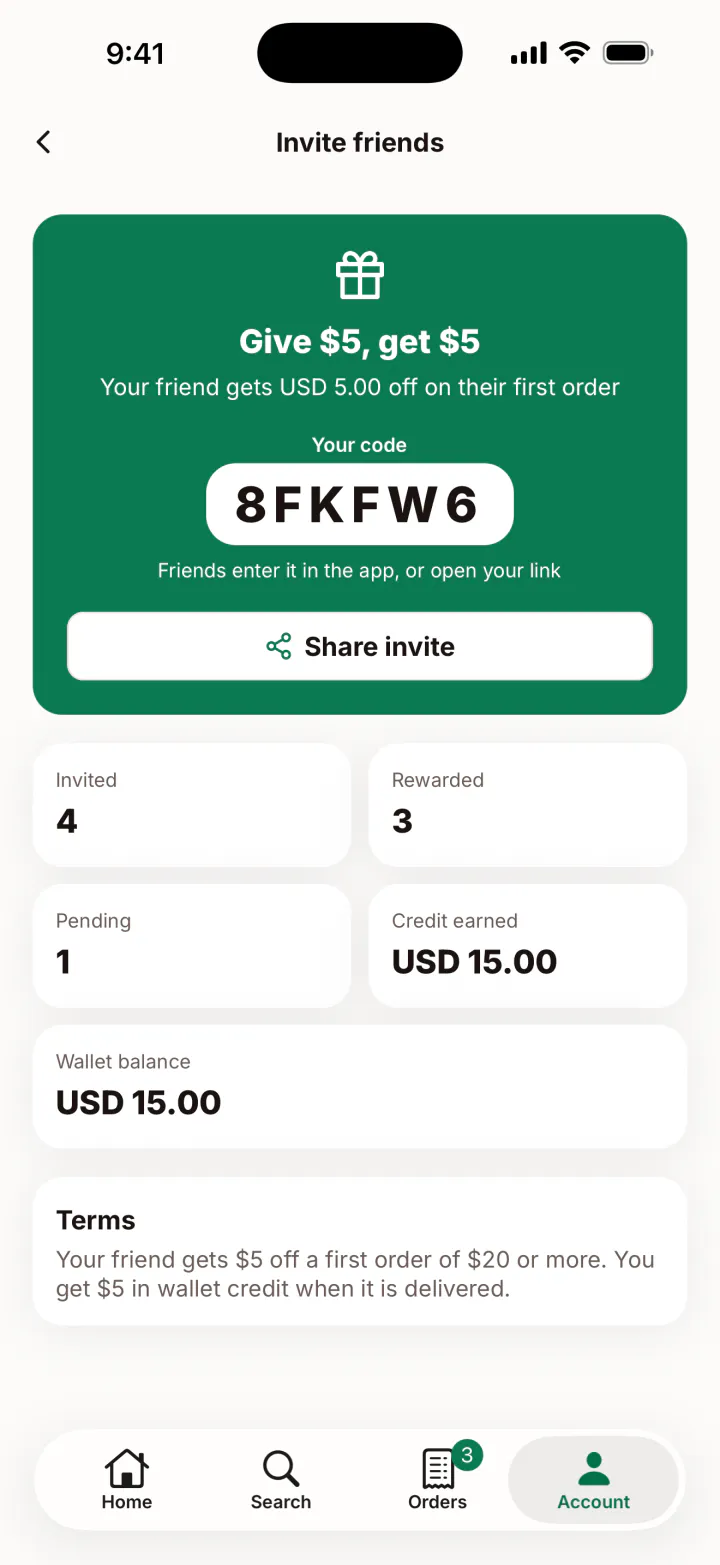
“Invite friends” is on the Account tab in the app and on the Account page of the website. It shows your program’s title, what the friend gets, the customer’s code, and counters such as “Invited”, “Pending”, “Rewarded” and “Wallet balance”.
- In the app, “Share invite” opens the phone’s share sheet with a ready message and the link.
- On the website, “Copy” copies the code and “Share link” shares or copies the link.
The link opens your website with the code attached. It does not open the app.
Using a friend’s code
The friend must have an account and must not have ordered yet.
- On the website, a friend who arrived through the link gets the code applied automatically after signing in. They can also enter it under “Have a friend’s referral code?”.
- In the app, the friend opens “Invite friends” and taps “Have a friend’s code?”, then “Apply code”. The app’s sign-up form has no code field.
The discount then appears by itself as “Referral discount” on an eligible order. No code is typed at checkout.
What each side gets
- The friend gets a discount: an amount or a percentage off the items, and free delivery if you set that. Friends never receive wallet credit.
- The inviter gets what your program sets, by default wallet credit, once the friend’s first order is completed (or accepted, if you chose that).
Good to know
- One code per customer, ever. A customer cannot use their own code.
- Guests cannot use or share codes.
- The referral discount does not combine with a promo code. The larger applies.
- With “first order only”, a friend who places a first order without the discount loses it. It comes back if that order is canceled or rejected.
- A reward already given to the inviter is not taken back if the order is canceled later.
- No push or email tells the inviter that a reward arrived. They see it in the “Invite friends” counters.
- With no program running, the app shows “No referral program right now” and the website shows “There’s no referral program running right now. Check back later.”
If something goes wrong
| The customer sees | Cause |
|---|---|
| “Referral codes are for customers who haven’t ordered yet.” | They have already placed an order. |
| “You’ve already used a referral code.” | One code per customer. |
| “That code doesn’t exist. Check it and try again.” | A typing mistake. After 10 wrong codes in an hour they must wait. |
| “That’s your own code. Share it with friends instead.” | They entered their own code. |
| A message that the time to use a code after signing up has passed | Your program limits the days after sign-up. |
| “Sign in to invite friends” | They are a guest. |
The full list is in the error message reference.
Answer you can reuse
Open “Invite friends” in your account and share your code. Your friend enters it before their first order and gets a discount, and your reward arrives after their first order is complete.