A customer's orders, and ordering again
What the order lists show in the app and on the website, why canceled orders are missing, and what "Order again" does.
Signed-in customers see their orders in a list in both clients. The lists leave out orders that were canceled, and “Order again” opens the seller without refilling the cart.
How it works
In the app
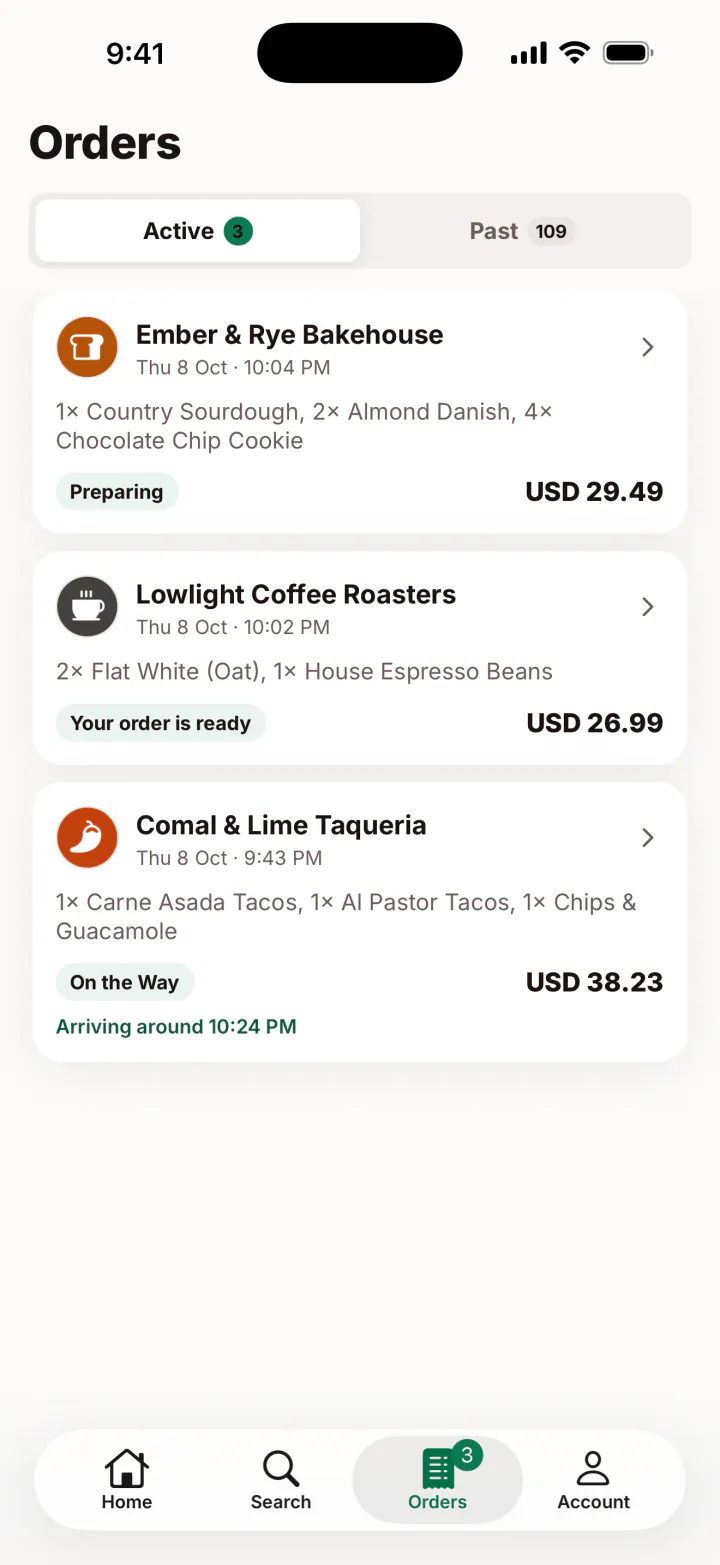
The Orders tab has two lists with counts:
- “Active”: orders waiting for the seller, being prepared or on the way. Tapping one opens tracking.
- “Past”: delivered orders and orders the seller rejected. Tapping one opens the receipt.
Each card shows the seller, the date, the items, the total and a status chip such as “Awaiting acceptance”, “In progress”, “On the way”, “Delivered” or “Rejected”.
The receipt is titled with the order number, for example “Order #1042”. It shows the status, the timeline, where it was delivered or picked up, the items with their options, the price rows and the payment line.
On the website
“Orders” in the avatar menu opens “My Orders”, newest first. A running order has “Track order”. An ended order has “Order again”.
Order again
In both clients “Order again” opens the seller’s page. Nothing is added to the cart. The customer picks the items again.
Good to know
- Canceled orders are missing from both lists for a signed-in customer. This covers orders the customer canceled and orders you canceled. The order is still in your admin panel.
- On the website a rejected order’s card reads “Canceled on” with the date.
- The website’s cards do not show the order number. The order page does.
- Neither list has search or pages.
- Guests have no list on the website. In the app a guest sees the orders placed on that phone, up to 20, including canceled ones.
- There are no ratings, reviews or “report a problem” on an order.
- No receipt is emailed, and there is no PDF or printable invoice.
- The app’s guest screen says “Sign in to see every order and reorder in a tap.” Reordering in a tap does not exist.
If something goes wrong
| The customer says | Cause | What to do |
|---|---|---|
| “My canceled order has vanished” | Canceled orders are left out of the lists. | Confirm from the admin panel that it was canceled. |
| “I cannot see an order I placed” | It was placed as a guest, or under another account. | Check the email or phone on the order in the admin panel. |
| “Order again did not add my items” | It opens the seller only. | Explain, and point to the receipt for the item list. |
| “I need a receipt” | None is emailed. | They can show the order page or receipt. For a tax number, use the website’s order page. |
Answer you can reuse
You can see your orders under Orders in the app, or under your account on our website. “Order again” takes you back to the seller so you can choose your items again.